Problem framing
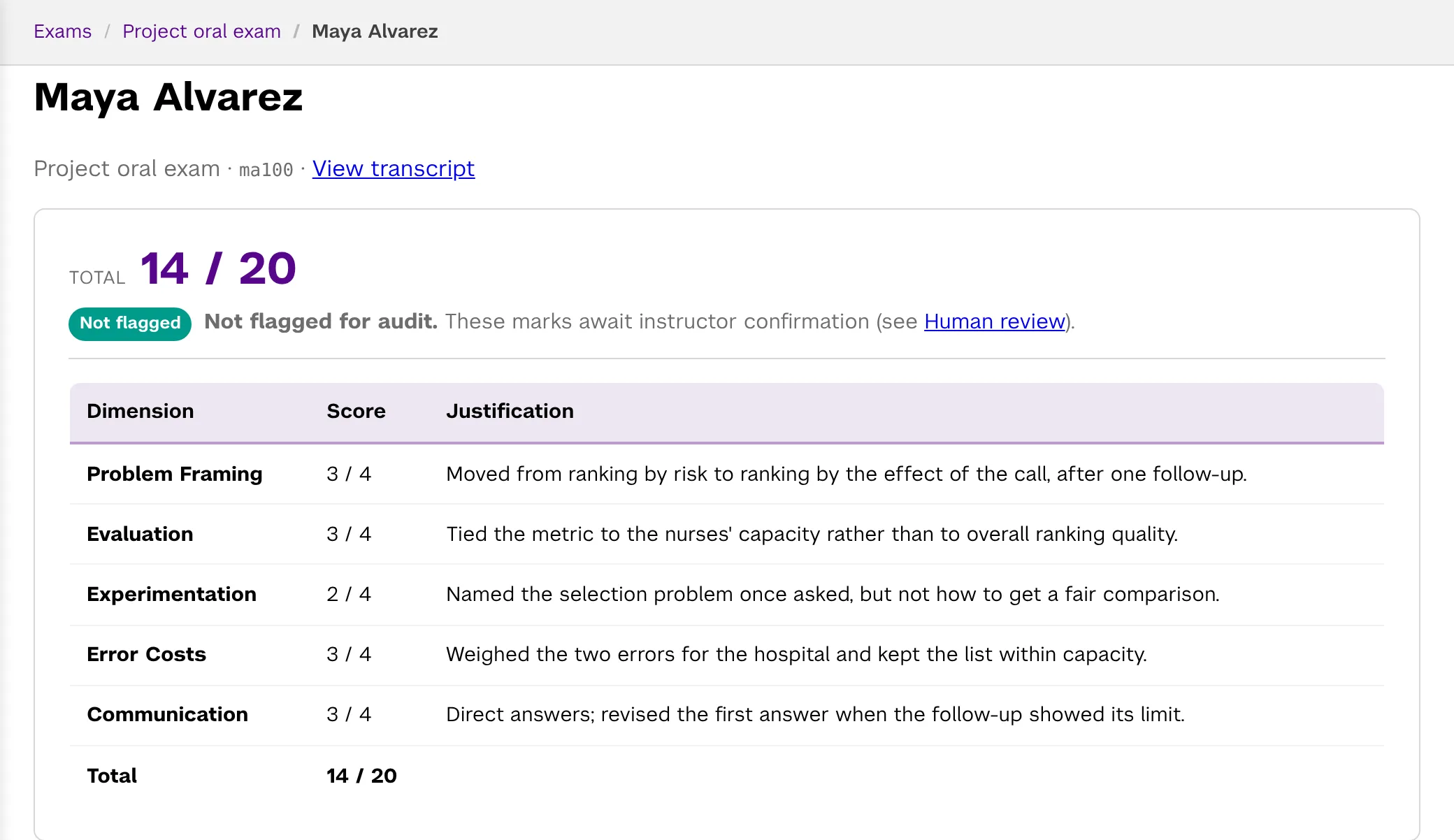
3 of 4, Proficient“So you'd want the patients where the call actually... changes something.”
Moved from ranking by risk to ranking by the effect of the call, after one follow-up.
Claude 3, Gemini 3, GPT 3Agreed
Viva by NYU Stern
Assess what students can explain, not only what they submit.
Students discuss their projects, cases, or course topics with an AI examiner. Viva proposes rubric-based grades with the evidence behind them. You review, adjust, and decide what students see.
Open to instructors at any institution: sign in with a Google account, a Microsoft account, or an email address. No approval step, and no charge during the alpha. Access, costs, and data
Developed at NYU Stern. More than 1,000 students have taken a Viva exam. The research behind it
Taking a Viva? Use the personal exam link your instructor shared with you. You do not need to sign in, and you do not need an account.
Sample exam
A 75-second excerpt from Maya's exam on her team project, and the grade Viva proposed for it.
Recorded with a synthetic student voice. The examiner follows up one question at a time rather than giving the answer away.
“So you'd want the patients where the call actually... changes something.”
Moved from ranking by risk to ranking by the effect of the call, after one follow-up.
Claude 3, Gemini 3, GPT 3Agreed
“Wait... the nurses chose who to call. So the two groups probably weren't, like, the same to begin with.”
Named the selection problem once asked, but not how to get a fair comparison.
First scores 2, 3, 2; after deliberation 2, 2, 2Agreed after deliberation
Illustrative grade for this excerpt. It stays a proposal until you release it.
How it works
Add topics and a rubric, or let the assistant draft them from your materials. Take the exam yourself, then generate one link per student.
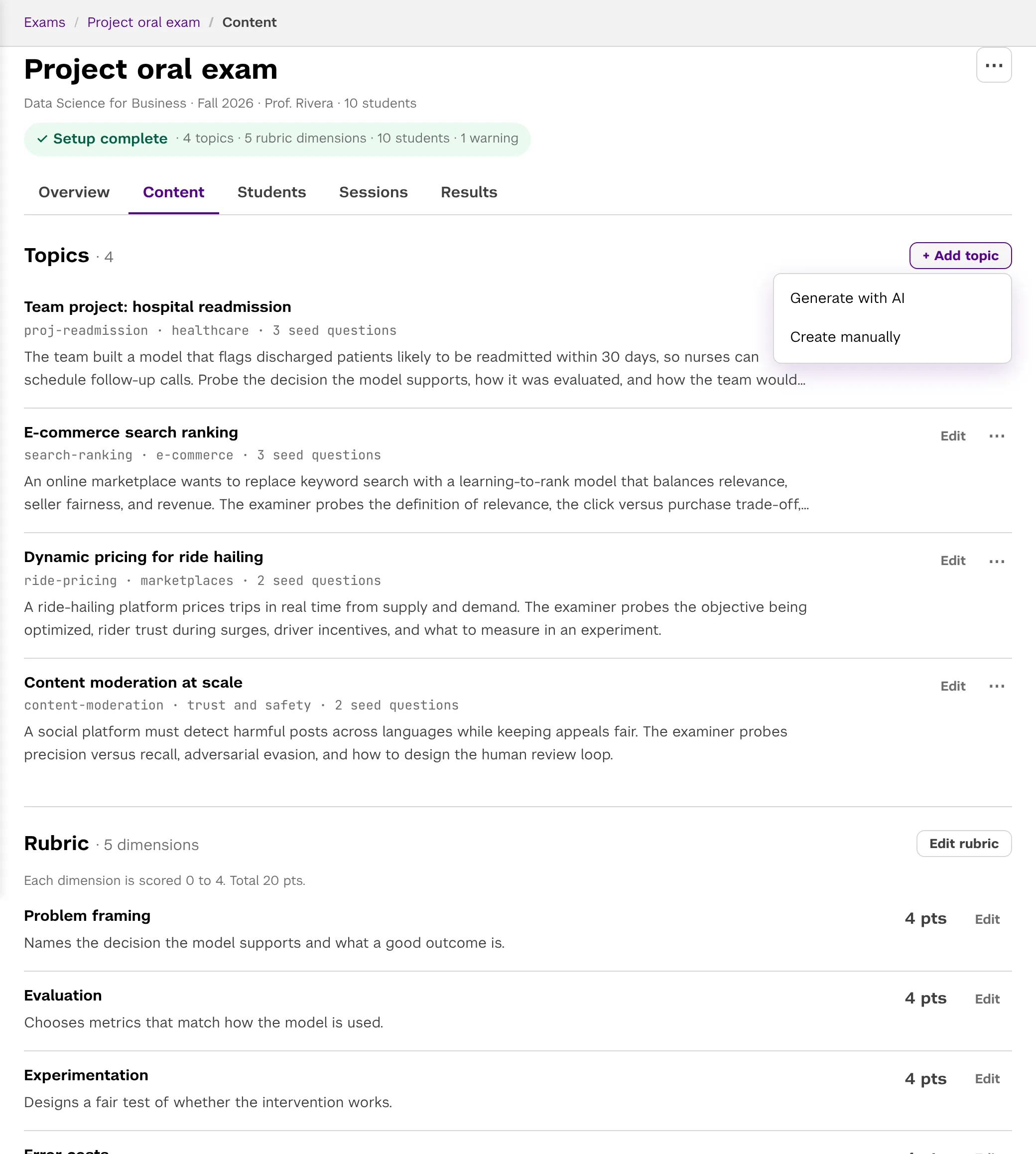
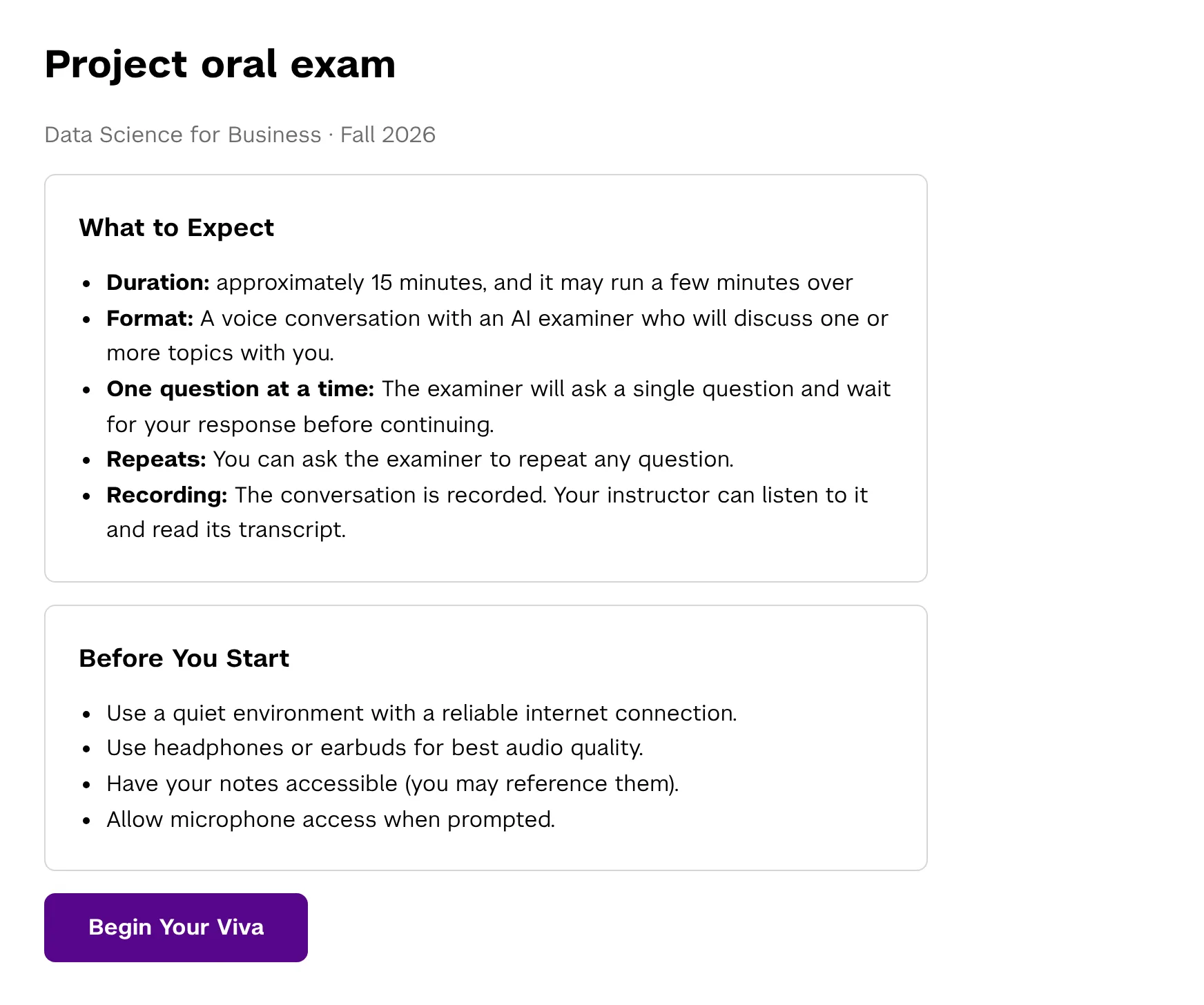
Each student opens their link, with no account, and talks with the examiner about their own topics for the length you set.
Check the proposed scores against the quotes and the recording, adjust any mark, and decide when students see it.
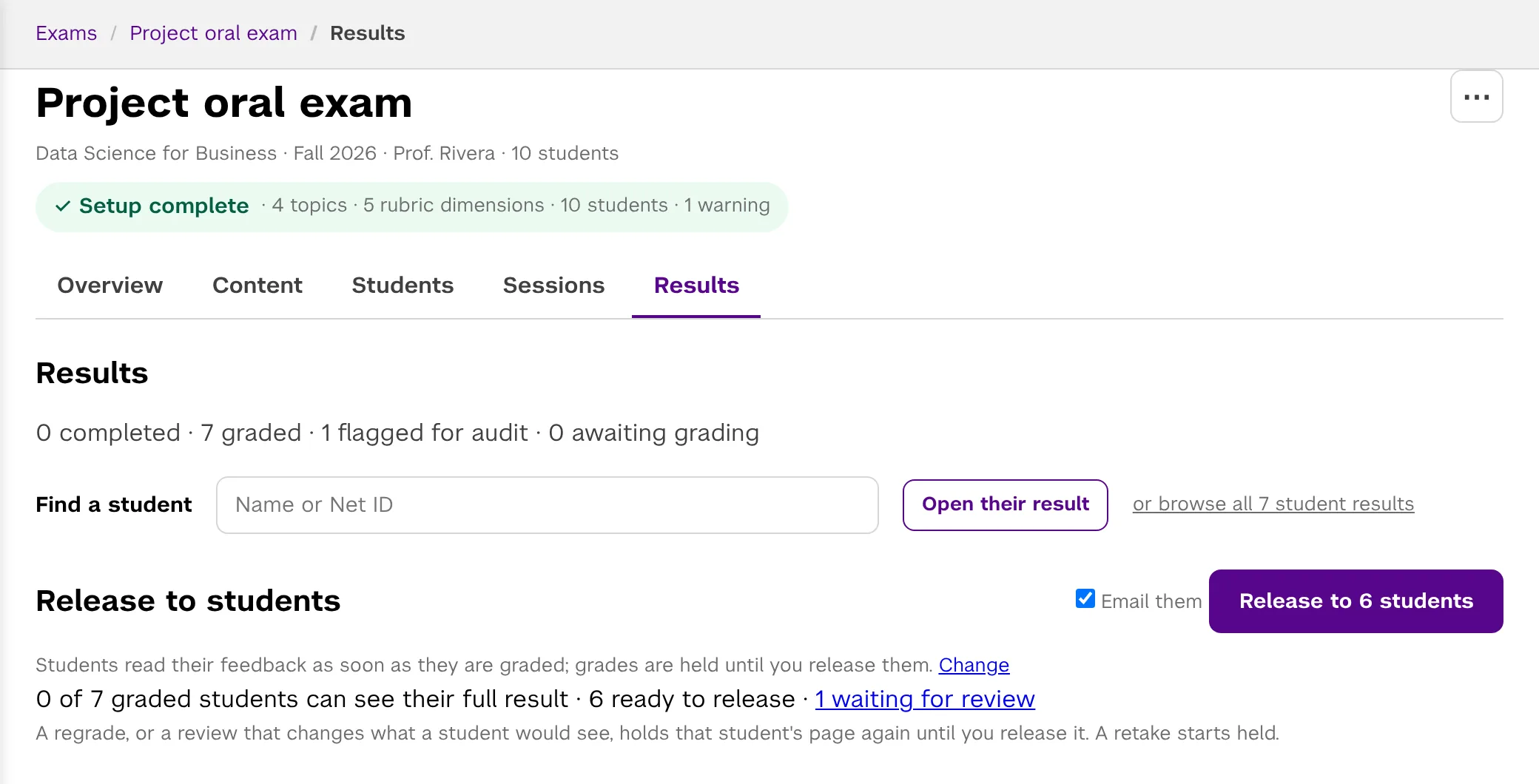
Screens from Viva with a sample exam.
Grading
Each score quotes the transcript. You can play the moment a quote comes from and read the whole conversation.
Three models grade independently, then compare their evidence. When they still disagree widely, the grade is flagged for your review and is not released until a person has looked at it.
Change any mark with a note to the student. Marks wait for your release by default, and you can sample unflagged grades too.
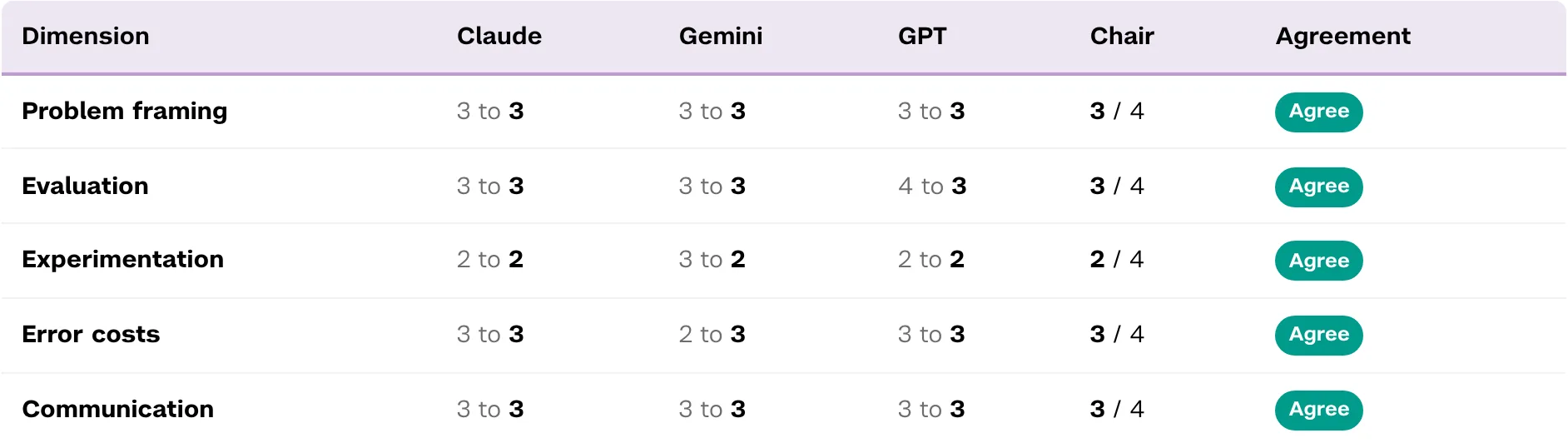
Claude, Gemini and GPT each score the transcript against your rubric on their own, then read each other's scores and evidence and revise or defend their own. A chair model writes the grade and the feedback. A session is flagged when the models are still more than two points apart on a dimension, or more than three on the total.
The full conversation, with the student's name and IDs removed
Each scores every dimension alone, quoting the transcript
Each reads the others' evidence and revises or defends its scores
Writes the grade, strengths and next steps
Adjust any mark, then release to students
Each exam is a sequence of phases, one per topic. Each phase carries only its own topic, and the conversation moves to the next phase when the examiner closes the current one.
next phase
next phase
Research
In the first deployments, described in a field report, most students agreed the exam tested their actual understanding, deliberation brought the grading models closer together, and grading cost under one dollar per exam.
Panos Ipeirotis and Konstantinos Rizakos, “Scalable and Personalized Oral Assessments Using Voice AI,” Communications of the ACM, November 2026 (forthcoming).
FAQ
Any instructor, at any institution. Sign in with a Google account, a Microsoft account, or an email address, and your account is created the first time. There is no approval step.
Nothing during the alpha: we cover the voice and model costs of alpha users' exams. Your profile page shows what your exams would have cost.
New accounts can own up to 3 exams, generate links for up to 50 students in total, and allow up to 3 attempts per student. Each day, a new account can use up to 100 AI-assisted actions, 300 student emails, and 50 MB of uploads. Students who already have links never count twice. To raise the limits, use "Request higher limits" on your profile page.
The transcript of each conversation, and the audio of each spoken one. Before they begin, students are told the conversation is recorded and that you can listen to it and read the transcript. Opening or downloading a recording is logged.
No. The student's name, NetID, email and university ID are removed from the transcript before Claude, Gemini and GPT grade it.
You set the exam's length and how many attempts students get, and you can allow an individual student another attempt.
Students explain and defend their reasoning in real time and answer follow-up questions on their own work, which is much harder to hand off than a written answer.
A computer with a microphone and a current browser; we recommend Chrome. A quiet room and headphones help. The exam page checks microphone access before the exam starts, and a failed check uses nothing up.
The page reconnects on its own. If the call still ends early, the student comes back to it and the examiner starts again at the first topic they had not finished, without using another attempt.
Point them to the sample on this page. You can also take the exam yourself as a preview before they do.
Download a CSV with each student's total, per-dimension scores, flags and feedback, and import it into your gradebook.
Set up an exam, take it yourself as a student would, then share the links.